
概览
ydPack 是一个极简的 JavaScript 打包器,实现了 Webpack 的核心思想:入口加载→依赖解析→代码转换→模块收集→产物生成。通过 tapable 暴露钩子支持插件扩展,流程与 Webpack 一致但大幅简化,适合理解打包器底层原理。
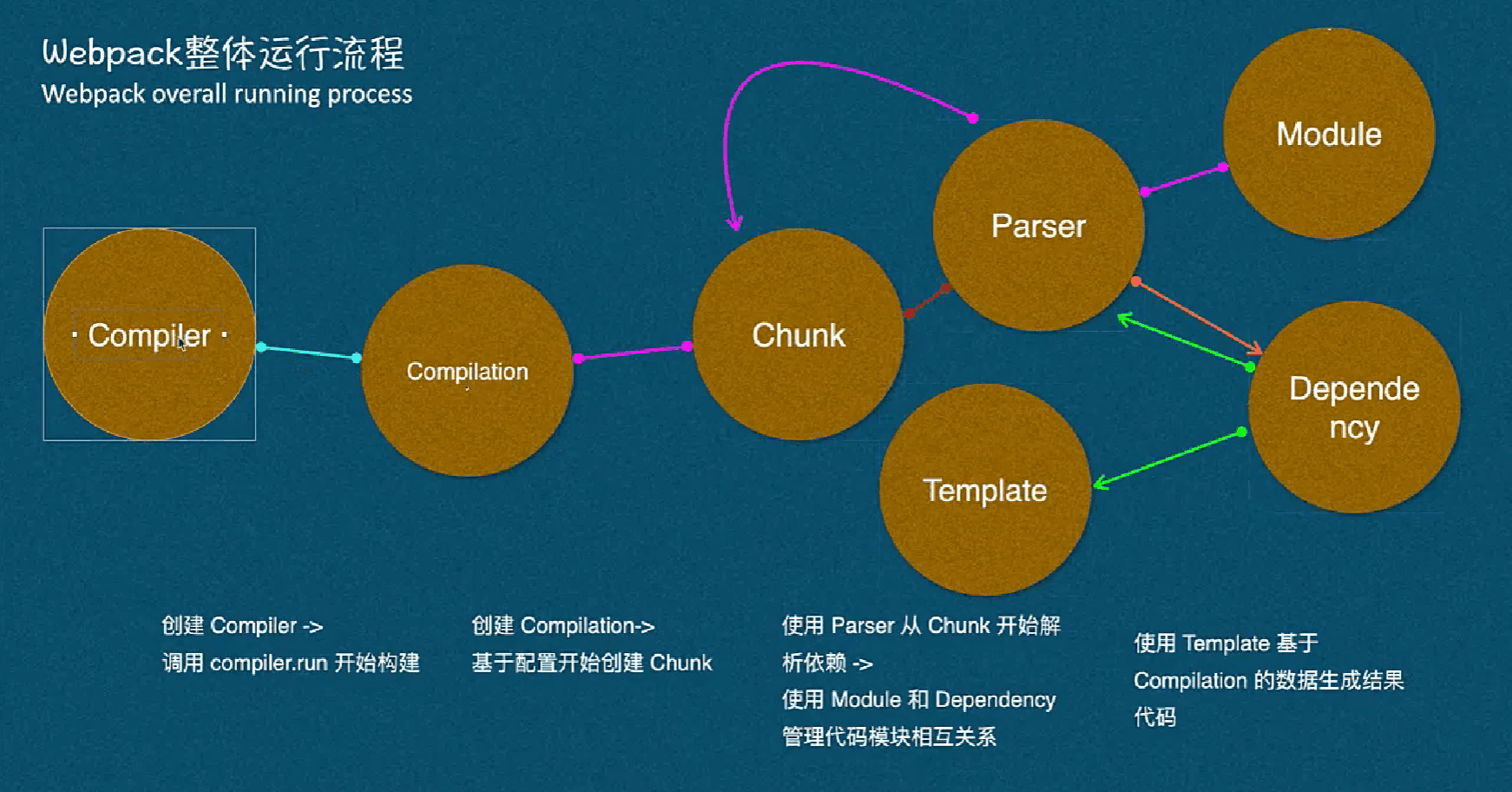
目录结构
ydPack/
├── index.js        # CLI启动入口,创建编译器并运行
├── webpack.js      # 工厂函数,组装Compiler并应用插件
├── Compiler.js     # 编译器核心,调度编译流程与产物生成
├── Compilation.js  # 单次编译生命周期,构建模块与收集依赖
├── Parser.js       # AST解析、依赖收集、代码转换(Babel)
├── Chunk.js        # 代码块项,封装多个模块的代码
├── Module.js       # 模块项,封装模块代码与元数据
├── Dependency.js   # 依赖项,记录模块间的依赖关系
└── Template.js     # 模板引擎,组装最终产物(如main.js)
核心流程图
sequenceDiagram
    participant CLI as CLI(index.js)
    participant Webpack as webpack(options)
    participant Compiler as Compiler
    participant Plugins as 插件
    participant Compilation as Compilation
    participant Parser as Parser
    participant Emit as emitAssets

    CLI->>Webpack: 调用webpack(options)
    Webpack->>Compiler: 实例化Compiler
    Compiler->>Plugins: plugins.apply(compiler)
    Compiler->>Compiler: 执行run方法
    Compiler->>Compiler: 执行compile方法
    Compiler->>Compilation: 创建newCompilation
    Compilation->>Compilation: 执行seal方法
    Compilation->>Compilation: buildModule(entry, isEntry=true)
    Compilation->>Parser: Parser.ast(entry文件)
    Parser->>Parser: getDependency(ast)
    Parser->>Parser: transform(ast)
    Parser-->>Compilation: 返回依赖和转换代码
    Compilation->>Compilation: 遍历依赖buildModule(..., false)
    Compilation-->>Compiler: callback(null, compilation)
    Compiler->>Emit: emitAssets(compilation)
    Emit->>Emit: 模板组装模块代码
    Emit->>Emit: 写入dist/main.js
模块职责与实现要点
1. index.js:CLI入口
读取用户配置,初始化编译器并启动编译,处理错误日志:
const webpack = require('./webpack');
const options = require('../ydpack.config.js');

const compiler = webpack(options);

compiler.run((err) => {
  if (err) {
    console.log('编译出错', err);
  }
});
2. webpack.js:工厂函数
创建 Compiler 实例并应用外部插件:
const Compiler = require('./Compiler');

const webpack = function (options) {
  const compiler = new Compiler(options);
  if (Array.isArray(options.plugins)) {
    for (const plugin of options.plugins) {
      plugin.apply(compiler); // 挂载插件
    }
  }
  return compiler;
};

module.exports = webpack;
3. Compiler.js:编译器核心
- 暴露钩子(如
run)支持插件扩展; run方法拉起构建流程,emitAssets生成最终产物;- 封装编译逻辑,协调
Compilation完成模块构建。
const { SyncHook } = require('tapable');
const Compilation = require('./Compilation');
const { join } = require('path');
const fs = require('fs');

class Compiler {
  constructor(options) {
    this.options = options;
    this.entry = options.entry;
    this.output = options.output;
    this.modules = [];
    this.hooks = { run: new SyncHook(['compilation']) }; // 插件钩子
  }

  run(callback) {
    console.log('[ 开始构建 ]');
    const onCompiled = (err, compilation) => {
      this.emitAssets(compilation); // 生成产物
    };
    this.compile(onCompiled);
  }

  compile(callback) {
    const compilation = this.newCompilation();
    this.hooks.run.call(compilation); // 触发插件钩子
    compilation.seal(callback);
  }

  newCompilation() {
    return new Compilation(this);
  }

  emitAssets(compilation) {
    console.log('🌺[ 生成dist main.js文件 ]🌺');
    const outputPath = join(this.output.path, this.output.filename);

    // 拼接模块表
    let _modules = '';
    this.modules.map((_module) => {
      _modules += `"${_module.filename}":(function (module, exports, require) {
                    ${_module.transformCode}
                  }),`;
    });

    // 运行时模板(模拟Webpack的__webpack_require__)
    const template = `(function (modules) {
      var installedModules = {};
      function __webpack_require__(moduleId) {
          if (installedModules[moduleId]) return installedModules[moduleId].exports;
          var module = installedModules[moduleId] = { exports: {} };
          modules[moduleId].call(module.exports, module, module.exports, __webpack_require__);
          return module.exports;
      }
      return __webpack_require__("${this.entry}");
    })({ ${_modules} })`;

    fs.writeFileSync(outputPath, template, 'utf-8');
  }
}

module.exports = Compiler;
4. Compilation.js:单次编译生命周期
- 维护本次编译的
modules列表; seal方法递归构建入口与依赖模块;buildModule调用Parser解析模块并转换代码。
const { join } = require('path');
const Parser = require('./Parser');

class Compilation {
  constructor(compiler) {
    const { options, modules } = compiler;
    this.options = options;
    this.modules = modules;
  }

  seal(callback) {
    const entryModule = this.buildModule(this.options.entry, true);
    this.modules.push(entryModule);

    // 递归处理依赖模块
    this.modules.map((_module) => {
      _module.dependencies.map((dependency) => {
        this.modules.push(this.buildModule(dependency, false));
      });
    });

    callback(null, this);
  }

  buildModule(filename, isEntry) {
    let absolutePath = '';
    let ast = '';
    if (!isEntry) {
      absolutePath = join(process.cwd(), './src/', filename); // 依赖路径约定
      ast = Parser.ast(absolutePath);
    } else {
      ast = Parser.ast(filename);
    }

    const dependencies = Parser.getDependency(ast);
    const transformCode = Parser.transform(ast);

    return { filename, dependencies, transformCode };
  }
}

module.exports = Compilation;
5. Parser.js:AST解析与转换
ast:读取文件并生成AST;getDependency:遍历AST收集import依赖;transform:使用Babel将ES6+转为ES5。
const babylon = require('babylon');
const traverse = require('babel-traverse').default;
const fs = require('fs');
const { transformFromAstSync } = require('@babel/core');

class Parser {
  static ast(path) {
    const content = fs.readFileSync(path, 'utf-8');
    return babylon.parse(content, { sourceType: 'module' });
  }

  static getDependency(ast) {
    const dependencies = [];
    traverse(ast, {
      ImportDeclaration: ({ node }) => {
        dependencies.push(node.source.value); // 收集import路径
      },
    });
    return dependencies;
  }

  static transform(ast) {
    const { code } = transformFromAstSync(ast, null, {
      presets: ['@babel/preset-env'], // ES6转ES5
    });
    return code;
  }
}

module.exports = Parser;
运行时产物模板
ydPack 生成的产物是一个自执行函数,包含:
modules表:存储所有模块的编译后代码;installedModules:模块缓存,避免重复加载;__webpack_require__:模拟模块加载器,实现require逻辑;- 入口模块执行:通过
__webpack_require__(entry)启动应用。
插件机制扩展
通过 compiler.hooks 可扩展打包流程,例如实现一个简单插件:
// 自定义插件
class LoggerPlugin {
  apply(compiler) {
    compiler.hooks.run.tap('LoggerPlugin', (compilation) => {
      console.log('🚀 编译开始了!');
    });
  }
}

// 配置文件中使用
module.exports = {
  entry: './src/index.js',
  output: { path: './dist', filename: 'main.js' },
  plugins: [new LoggerPlugin()],
};
备注
- 依赖路径约定:非入口模块从项目根目录的
src/解析; - 输出路径:由配置的
output.path和output.filename决定; - 空文件说明:
Chunk.js/Module.js等为占位,对应 Webpack 中更复杂的模块/Chunk 管理,ydPack 简化后暂未实现。
核心特性总结
| 功能 | 实现方式 |
|---|---|
| 依赖解析 | 遍历AST收集import语句 |
| 代码转换 | Babel将ES6+转为ES5 |
| 模块缓存 | installedModules对象缓存已加载模块 |
| 插件扩展 | tapable钩子触发自定义逻辑 |
| 产物生成 | 拼接运行时模板并写入文件 |